

经常看到一些博客点击外链跳转到其他网站上的时候都会有一个跳转页面,很是漂亮。据说是有利于SEO,保护站点权重,不过个人只是觉得好看、高逼格便加上了 。网上相关的源代码很多,只是代码使用的方法不太详细,对于很多新手小白可能并不友好,希望能够帮助新人快速地使用上这个跳转功能。
效果一

代码如下:
<?php
/**
 * 自动跳转页面
 */
//自定义跳转地址
$cars = array(
    array("rwdh",'https://www.vipiu.net/'),
    array("jsys",'https://www.vipiu.net/'),
 );

if(strlen($_SERVER['REQUEST_URI']) > 384 || strpos($_SERVER['REQUEST_URI'], "eval(") || strpos($_SERVER['REQUEST_URI'], "base64")) {
    @header("HTTP/1.1 414 Request-URI Too Long");
    @header("Status: 414 Request-URI Too Long");
    @header("Connection: Close");
    @exit;
}
//通过QUERY_STRING取得完整的传入数据,然后取得url=之后的所有值,兼容性更好
$t_url = htmlspecialchars(preg_replace('/^url=(.*)$/i','$1',$_SERVER["QUERY_STRING"]));

//此处可以自定义一些特别的外链,不需要可以删除以下5行
foreach($cars as $k=>$val){
    if($t_url==$val[0] ) {
        $t_url = $val[1];
        $t_vip = 1;
    }
}

//数据处理
if(!empty($t_url)) {
    //判断取值是否加密
    if ($t_url == base64_encode(base64_decode($t_url))) {
        $t_url = base64_decode($t_url);
    }
 //对取值进行网址校验和判断
preg_match('/^(http|https|thunder|qqdl|ed2k|Flashget|qbrowser):\/\//i',$t_url,$matches);
if($matches){
    $url=$t_url;
    $title='页面加载中,请稍候...';
} else {
    preg_match('/\./i',$t_url,$matche);
    if($matche){
        $url='http://'.$t_url;
        $title='页面加载中,请稍候...';
    } else {
        $url = 'http://'.$_SERVER['HTTP_HOST'];
        $title='参数错误,正在返回首页...';
    }
}
} else {
    $title = '参数缺失,正在返回首页...';
    $url = 'http://'.$_SERVER['HTTP_HOST'];
}
?>
<html>
<head>
    <meta http-equiv="Content-Type" content="text/html; charset=UTF-8">
    <meta name="viewport" content="width=device-width">
    <meta name="robots" content="noindex, nofollow" />
    <noscript><meta http-equiv="refresh" content="1;url='<?php echo $url;?>';"></noscript>
    <meta charset="UTF-8">
<!--[if IE 8]>
    <style>
        .ie8 .alert-circle,.ie8 .alert-footer{display:none}.ie8 .alert-box{padding-top:75px}.ie8 .alert-sec-text{top:45px}
    </style>
<![endif]-->

    <title><?php echo $title;?></title>
    <style>
        body{margin:0;padding:0;background:#E6EAEB;font-family:Arial,'微软雅黑','宋体',sans-serif}.main{position:absolute;left:calc(50% - 200px);top:calc(50% - 13em)}.alert-box{display:none;position:relative;margin:auto;padding:180px 85px 22px;border-radius:10px 10px 0 0;background:#FFF;box-shadow:5px 9px 17px rgba(102,102,102,.75);width:286px;color:#FFF;text-align:center}.alert-box p{margin:0}.alert-circle{position:absolute;top:-50px;left:111px}.alert-sec-circle{stroke-dashoffset:0;stroke-dasharray:735;transition:stroke-dashoffset 1s linear}.alert-sec-text{position:absolute;top:11px;left:190px;width:76px;color:#000;font-size:68px}.alert-sec-unit{font-size:34px}.alert-body{margin:35px 0}.alert-head{color:#242424;font-size:28px}.alert-concent{margin:25px 0 14px;color:#7B7B7B;font-size:18px}.alert-concent p{line-height:27px}.alert-btn{display:block;border-radius:10px;background-color:#4AB0F7;height:55px;line-height:55px;width:286px;color:#FFF;font-size:20px;text-decoration:none;letter-spacing:2px}.alert-btn:hover{background-color:#6BC2FF}.alert-footer{margin:0 auto;height:42px;width:120px}.alert-footer-icon{float:left}.alert-footer-text{float:left;border-left:2px solid #EEE;padding:3px 0 0 5px;height:40px;color:#0B85CC;font-size:12px;text-align:left}.alert-footer-text p{color:#7A7A7A;font-size:22px;line-height:18px}
    </style>
</head>
<body class="ie8" style="">
<div class="main">
    <div id="js-alert-box" class="alert-box" style="display:block">
        <svg class="alert-circle" width="234" height="234"><circle cx="117" cy="117" r="108" fill="#FFF" stroke="#43AEFA" stroke-width="17"></circle><circle id="js-sec-circle" class="alert-sec-circle" cx="117" cy="117" r="108" fill="transparent" stroke="#F4F1F1" stroke-width="18" transform="rotate(-90 117 117)" style="stroke-dashoffset:-514px"></circle><text class="alert-sec-unit" x="100" y="172" fill="#BDBDBD">秒</text></svg>
        <div id="js-sec-text" class="alert-sec-text">
        3
        </div>
        <div class="alert-body">
            <div id="js-alert-head" class="alert-head">
            <?php echo $title;?>
            </div>
            <div class="alert-concent">
            <p>一万年太久,只争朝夕</p>
            </div>
            <a id="js-alert-btn" class="alert-btn" href="<?php echo $url;?>">立即前往</a>
        </div>
        <div class="alert-footer clearfix">
            <svg width="46px" height="42px" class="alert-footer-icon"><circle fill-rule="evenodd" clip-rule="evenodd" fill="#7B7B7B" stroke="#DEDFE0" stroke-width="2" stroke-miterlimit="10" cx="21.917" cy="21.25" r="17"></circle><path fill="#FFF" d="M22.907,27.83h-1.98l0.3-2.92c-0.37-0.22-0.61-0.63-0.61-1.1c0-0.71,0.58-1.29,1.3-1.29s1.3,0.58,1.3,1.29 c0,0.47-0.24,0.88-0.61,1.1L22.907,27.83z M18.327,17.51c0-1.98,1.61-3.59,3.59-3.59s3.59,1.61,3.59,3.59v2.59h-7.18V17.51z M27.687,20.1v-2.59c0-3.18-2.59-5.76-5.77-5.76s-5.76,2.58-5.76,5.76v2.59h-1.24v10.65h14V20.1H27.687z"></path><circle fill-rule="evenodd" clip-rule="evenodd" fill="#FEFEFE" cx="35.417" cy="10.75" r="6.5"></circle><polygon fill="#7B7B7B" stroke="#7B7B7B" stroke-linecap="round" stroke-linejoin="round" stroke-miterlimit="10" points="35.417,12.16 32.797,9.03 31.917,10.07 35.417,14.25 42.917,5.29 42.037,4.25 "></polygon></svg>
            <div class="alert-footer-text">
                <p>secure</p>安全加密
            </div>
        </div>
    </div>
</div>
<script type="text/javascript">
function alertSet(e) {
    document.getElementById("js-alert-box").style.display = "block", document.getElementById("js-alert-head").innerHTML = e;
    var t = 3,
        n = document.getElementById("js-sec-circle");
    document.getElementById("js-sec-text").innerHTML = t, setInterval(function() {
        //禁止其他网站调用此跳转
        //var MyHOST = new RegExp("<?php echo $_SERVER['HTTP_HOST']; ?>");
        //if (!MyHOST.test(document.referrer)) {
        // location.rel="nofollow" href="https://sfhzb.cn/" + MyHOST;
        //}
        if (0 == t) location.href = "<?php echo $url;?>";
        else {
            t -= 1, document.getElementById("js-sec-text").innerHTML = t;
            var e = Math.round(t / 5 * 735);
            n.style.strokeDashoffset = e - 735
        }
    }, 970)
}
</script>
<script>alertSet("<?php echo $title;?>");</script>
</body>
</html>
效果二
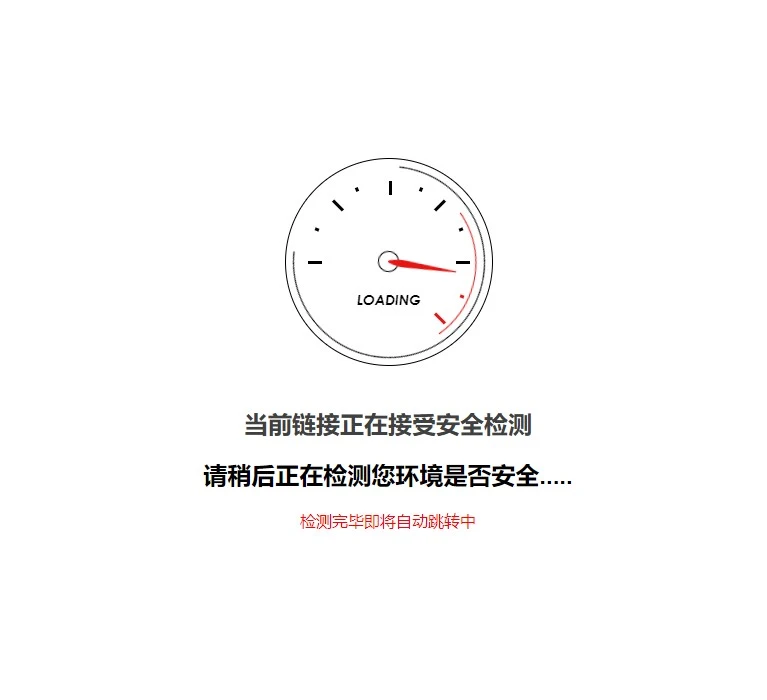
代码如下:
<?php

if (
    strlen($_SERVER['REQUEST_URI']) > 384 ||
    strpos($_SERVER['REQUEST_URI'], "eval(") ||
    strpos($_SERVER['REQUEST_URI'], "base64")
) {
    @header("HTTP/1.1 414 Request-URI Too Long");
    @header("Status: 414 Request-URI Too Long");
    @header("Connection: Close");
    @exit;
}
//通过 QUERY_STRING 取得完整的传入数据,然后取得 url=之后的所有值,兼容性更好

@session_start();
$t_url = !empty($_SESSION['GOLINK']) ? $_SESSION['GOLINK'] : preg_replace('/^url=(.*)$/i', '$1', $_SERVER["QUERY_STRING"]);
//数据处理
if (!empty($t_url)) {
    //判断取值是否加密
    if ($t_url == base64_encode(base64_decode($t_url))) {
        $t_url = base64_decode($t_url);
    }
    //防止 xss
    $t_url = htmlspecialchars($t_url);

    //对取值进行网址校验和判断
    preg_match('/^(http|https|thunder|qqdl|ed2k|Flashget|qbrowser):\/\//i', $t_url, $matches);
    if ($matches) {
        $url   = $t_url;
        $title = '页面加载中,请稍候...';
    } else {
        preg_match('/\./i', $t_url, $matche);
        if ($matche) {
            $url   = 'http://' . $t_url;
            $title = '页面加载中,请稍候...';
        } else {
            $url   = 'http://' . $_SERVER['HTTP_HOST'];
            $title = '参数错误,正在返回首页...';
        }
    }
} else {
    $title = '参数缺失,正在返回首页...';
    $url   = 'http://' . $_SERVER['HTTP_HOST'];
}

$url = str_replace('&', '&', $url);
?>
<html>

<head>
    <meta http-equiv="Content-Type" content="text/html; charset=UTF-8">
    <meta name="robots" content="noindex, nofollow" />
    <meta name="viewport" content="width=device-width, initial-scale=1.0, user-scalable=0, minimum-scale=1.0, maximum-scale=1.0">
    <noscript>
        <meta http-equiv="refresh" content="1;url='<?php echo $url; ?>';">
    </noscript>
    <script>
        function link_jump() {
            //禁止其他网站使用我们的跳转页面
            var MyHOST = new RegExp("<?php echo $_SERVER['HTTP_HOST']; ?>");
            if (!MyHOST.test(document.referrer)) {
                location.href = "http://" + MyHOST;
            }
            location.href = "<?php echo $url; ?>";
        }
        //延时 1S 跳转,可自行修改延时时间
        setTimeout(link_jump, 1500);
        //延时 50S 关闭跳转页面,用于文件下载后不会关闭跳转页的问题
        setTimeout(function() {
            window.opener = null;
            window.close();
        }, 50000);
    </script>
    <title><?php echo $title; ?></title>
   <style type="text/css">
    html,
    body {
      width: 100%;
      height: 100%;
      margin: 0;
      padding: 0;
    }

    body {
      background-color: #ffffff;
      font-family: Helvetica, Arial, sans-serif;
      font-size: 100%;
    }

    h1 {
      font-size: 1.5em;
      color: #404040;
      text-align: center;
    }

    p {
      font-size: 1em;
      color: #404040;
      text-align: center;
      margin: 10px 0 0 0;
    }

    #spinner {
      margin: 0 auto 30px auto;
      display: block;
    }

    .attribution {
      margin-top: 20px;
    }

    #cssload-wrapper {
      position: absolute;
      left: 0;
      top: 0;
      right: 0;
      bottom: 0;
      z-index: 15;
      overflow: hidden;
    }

    .cssload-loader {
      width: 206px;
      height: 206px;
      border: 1px rgb(0, 0, 0) solid;
      position: absolute;
      left: 50%;
      top: 50%;
      margin: -250px 0 0 -103px;
      border-radius: 50%;
      -o-border-radius: 50%;
      -ms-border-radius: 50%;
      -webkit-border-radius: 50%;
      -moz-border-radius: 50%;
    }

    .cssload-loader .cssload-loading {
      font-size: 14px;
      position: absolute;
      width: 100%;
      text-align: center;
      line-height: 19px;
      font-family: 'Century Gothic', sans-serif;
      font-style: italic;
      left: 0;
      top: 50%;
      margin-top: 28px;
      color: rgb(0, 0, 0);
      font-weight: bold;
      text-transform: uppercase;
      -o-text-transform: uppercase;
      -ms-text-transform: uppercase;
      -webkit-text-transform: uppercase;
      -moz-text-transform: uppercase;
    }

    .cssload-loader-circle-1 {
      width: 190px;
      height: 190px;
      left: 7px;
      top: 7px;
      border: 1px rgb(0, 0, 0) solid;
      position: absolute;
      border-right-color: transparent;
      border-radius: 50%;
      -o-border-radius: 50%;
      -ms-border-radius: 50%;
      -webkit-border-radius: 50%;
      -moz-border-radius: 50%;
      animation: spin 3.45s linear infinite;
      -o-animation: spin 3.45s linear infinite;
      -ms-animation: spin 3.45s linear infinite;
      -webkit-animation: spin 3.45s linear infinite;
      -moz-animation: spin 3.45s linear infinite;
    }

    .cssload-loader-circle-2 {
      width: 173px;
      height: 173px;
      left: 7px;
      top: 7px;
      border: 1px transparent solid;
      position: absolute;
      border-right-color: rgb(232, 21, 18);
      border-radius: 50%;
      -o-border-radius: 50%;
      -ms-border-radius: 50%;
      -webkit-border-radius: 50%;
      -moz-border-radius: 50%;
      animation: spin 5.75s linear infinite;
      -o-animation: spin 5.75s linear infinite;
      -ms-animation: spin 5.75s linear infinite;
      -webkit-animation: spin 5.75s linear infinite;
      -moz-animation: spin 5.75s linear infinite;
    }

    .cssload-loader .cssload-line {
      width: 14px;
      height: 3px;
      background: rgb(0, 0, 0);
      position: absolute;
    }

    .cssload-loader .cssload-line:nth-child(1) {
      left: 22px;
      top: 50%;
      margin-top: -1px;
    }

    .cssload-loader .cssload-line:nth-child(2) {
      transform: rotate(45deg);
      -o-transform: rotate(45deg);
      -ms-transform: rotate(45deg);
      -webkit-transform: rotate(45deg);
      -moz-transform: rotate(45deg);
      left: 45px;
      top: 45px;
    }

    .cssload-loader .cssload-line:nth-child(3) {
      top: 22px;
      left: 50%;
      width: 3px;
      height: 14px;
    }

    .cssload-loader .cssload-line:nth-child(4) {
      transform: rotate(135deg);
      -o-transform: rotate(135deg);
      -ms-transform: rotate(135deg);
      -webkit-transform: rotate(135deg);
      -moz-transform: rotate(135deg);
      right: 45px;
      top: 45px;
    }

    .cssload-loader .cssload-line:nth-child(5) {
      right: 22px;
      top: 50%;
      margin-top: -1px;
    }

    .cssload-loader .cssload-line:nth-child(6) {
      transform: rotate(45deg);
      -o-transform: rotate(45deg);
      -ms-transform: rotate(45deg);
      -webkit-transform: rotate(45deg);
      -moz-transform: rotate(45deg);
      right: 45px;
      bottom: 45px;
      background: rgb(232, 21, 18);
    }

    .cssload-loader .cssload-subline {
      position: absolute;
      width: 4px;
      height: 3px;
      background: rgb(0, 0, 0);
    }

    .cssload-loader .cssload-subline:nth-child(7) {
      transform: rotate(22.5deg);
      -o-transform: rotate(22.5deg);
      -ms-transform: rotate(22.5deg);
      -webkit-transform: rotate(22.5deg);
      -moz-transform: rotate(22.5deg);
      left: 29px;
      top: 69px;
    }

    .cssload-loader .cssload-subline:nth-child(8) {
      transform: rotate(67.5deg);
      -o-transform: rotate(67.5deg);
      -ms-transform: rotate(67.5deg);
      -webkit-transform: rotate(67.5deg);
      -moz-transform: rotate(67.5deg);
      left: 69px;
      top: 29px;
    }

    .cssload-loader .cssload-subline:nth-child(9) {
      transform: rotate(112.5deg);
      -o-transform: rotate(112.5deg);
      -ms-transform: rotate(112.5deg);
      -webkit-transform: rotate(112.5deg);
      -moz-transform: rotate(112.5deg);
      right: 69px;
      top: 29px;
    }

    .cssload-loader .cssload-subline:nth-child(10) {
      transform: rotate(157.5deg);
      -o-transform: rotate(157.5deg);
      -ms-transform: rotate(157.5deg);
      -webkit-transform: rotate(157.5deg);
      -moz-transform: rotate(157.5deg);
      right: 29px;
      top: 69px;
    }

    .cssload-loader .cssload-subline:nth-child(11) {
      transform: rotate(22.5deg);
      -o-transform: rotate(22.5deg);
      -ms-transform: rotate(22.5deg);
      -webkit-transform: rotate(22.5deg);
      -moz-transform: rotate(22.5deg);
      right: 28px;
      bottom: 67px;
      background: rgb(232, 21, 18);
    }

    .cssload-loader .cssload-needle {
      width: 19px;
      height: 19px;
      border: 1px rgb(0, 0, 0) solid;
      position: absolute;
      left: 50%;
      top: 50%;
      margin: -11px 0 0 -11px;
      z-index: 1;
      border-radius: 50%;
      -o-border-radius: 50%;
      -ms-border-radius: 50%;
      -webkit-border-radius: 50%;
      -moz-border-radius: 50%;
      animation: pegIt 3.45s infinite ease-in-out;
      -o-animation: pegIt 3.45s infinite ease-in-out;
      -ms-animation: pegIt 3.45s infinite ease-in-out;
      -webkit-animation: pegIt 3.45s infinite ease-in-out;
      -moz-animation: pegIt 3.45s infinite ease-in-out;
    }

    .cssload-loader .cssload-needle:before {
      content: "";
      width: 0;
      height: 0;
      border-style: solid;
      border-width: 4.5px 69px 4.5px 0;
      border-color: transparent rgb(232, 21, 18) transparent transparent;
      position: absolute;
      right: 50%;
      top: 50%;
      margin: -4.5px 0 0 0;
      border-radius: 0 50% 50% 0;
      -o-border-radius: 0 50% 50% 0;
      -ms-border-radius: 0 50% 50% 0;
      -webkit-border-radius: 0 50% 50% 0;
      -moz-border-radius: 0 50% 50% 0;
    }


    @keyframes pegIt {
      0% {
        transform: rotate(0deg);
      }
      16% {
        transform: rotate(75deg);
      }
      25% {
        transform: rotate(55deg);
      }
      30% {
        transform: rotate(90deg);
      }
      36% {
        transform: rotate(170deg);
      }
      42% {
        transform: rotate(150deg);
      }
      50% {
        transform: rotate(227deg);
      }
      100% {
        transform: rotate(0deg);
      }
    }

    @-o-keyframes pegIt {
      0% {
        -o-transform: rotate(0deg);
      }
      16% {
        -o-transform: rotate(75deg);
      }
      25% {
        -o-transform: rotate(55deg);
      }
      30% {
        -o-transform: rotate(90deg);
      }
      36% {
        -o-transform: rotate(170deg);
      }
      42% {
        transform: rotate(150deg);
      }
      50% {
        -o-transform: rotate(227deg);
      }
      100% {
        -o-transform: rotate(0deg);
      }
    }

    @-ms-keyframes pegIt {
      0% {
        -ms-transform: rotate(0deg);
      }
      16% {
        -ms-transform: rotate(75deg);
      }
      25% {
        -ms-transform: rotate(55deg);
      }
      30% {
        -ms-transform: rotate(90deg);
      }
      36% {
        -ms-transform: rotate(170deg);
      }
      42% {
        transform: rotate(150deg);
      }
      50% {
        -ms-transform: rotate(227deg);
      }
      100% {
        -ms-transform: rotate(0deg);
      }
    }

    @-webkit-keyframes pegIt {
      0% {
        -webkit-transform: rotate(0deg);
      }
      16% {
        -webkit-transform: rotate(75deg);
      }
      25% {
        -webkit-transform: rotate(55deg);
      }
      30% {
        -webkit-transform: rotate(90deg);
      }
      36% {
        -webkit-transform: rotate(170deg);
      }
      42% {
        transform: rotate(150deg);
      }
      50% {
        -webkit-transform: rotate(227deg);
      }
      100% {
        -webkit-transform: rotate(0deg);
      }
    }

    @-moz-keyframes pegIt {
      0% {
        -moz-transform: rotate(0deg);
      }
      16% {
        -moz-transform: rotate(75deg);
      }
      25% {
        -moz-transform: rotate(55deg);
      }
      30% {
        -moz-transform: rotate(90deg);
      }
      36% {
        -moz-transform: rotate(170deg);
      }
      42% {
        transform: rotate(150deg);
      }
      50% {
        -moz-transform: rotate(227deg);
      }
      100% {
        -moz-transform: rotate(0deg);
      }
    }

    @keyframes spin {
      0% {
        transform: rotate(0deg);
      }
      100% {
        transform: rotate(360deg);
      }
    }

    @-o-keyframes spin {
      0% {
        -o-transform: rotate(0deg);
      }
      100% {
        -o-transform: rotate(360deg);
      }
    }

    @-ms-keyframes spin {
      0% {
        -ms-transform: rotate(0deg);
      }
      100% {
        -ms-transform: rotate(360deg);
      }
    }

    @-webkit-keyframes spin {
      0% {
        -webkit-transform: rotate(0deg);
      }
      100% {
        -webkit-transform: rotate(360deg);
      }
    }

    @-moz-keyframes spin {
      0% {
        -moz-transform: rotate(0deg);
      }
      100% {
        -moz-transform: rotate(360deg);
      }
    }
  </style>
</head>

<body>
  <table width="100%" height="100%" cellpadding="20">
    <tbody><tr>
      <td align="center" valign="middle">
        <div class="up-browser-verification up-im-under-attack">
          <noscript><h1 data-translate="turn_on_js" style="color:#bd2426;">Please turn JavaScript on and reload the page.</h1></noscript>
          <div id="anticc-content">
            <div id="cssload-wrapper">
              <div class="cssload-loader">
                <div class="cssload-line"></div>
                <div class="cssload-line"></div>
                <div class="cssload-line"></div>
                <div class="cssload-line"></div>
                <div class="cssload-line"></div>
                <div class="cssload-line"></div>
                <div class="cssload-subline"></div>
                <div class="cssload-subline"></div>
                <div class="cssload-subline"></div>
                <div class="cssload-subline"></div>
                <div class="cssload-subline"></div>
                <div class="cssload-loader-circle-1">
                  <div class="cssload-loader-circle-2"></div>
                </div>
                <div class="cssload-needle"></div>
                <div class="cssload-loading">loading</div>
              </div>
            </div>
            <br>
            <br>
            <br>
            <br>
            <br>
            <br>
            <h1><span data-translate="checking_browser">当前链接正在接受安全检测</span></h1>
            <h2><span data-translate="checking_browser">请稍后正在检测您环境是否安全.....</span></h2>
            <span style="color:red;font-family:'Microsoft YaHei'">检测完毕即将自动跳转中</span>

          </div>
        </div>
      </td>
    </tr>
  </tbody></table>

</html>
教程
新建跳转页面
首先,任选上面一段代码复制并保存为一个 go.php 文件放到网站根目录的下
文章内外链添加go跳转
将以下代码放到你的主题的functions.php中
//文章内外链添加go跳转
function the_content_nofollow($content){
    preg_match_all('/<a(.*?)href="(.*?)"(.*?)>/',$content,$matches);
    if($matches){
        foreach($matches[2] as $val){
            if(strpos($val,'://')!==false && strpos($val,home_url())===false && !preg_match('/\.(jpg|jepg|png|ico|bmp|gif|tiff)/i',$val)){
                $content=str_replace("href=\"$val\"", "href=\"".home_url()."/go.php/?url=$val\" ",$content);
            }
        }
    }
 return $content;
}
add_filter('the_content','the_content_nofollow',999);
评论者链接添加go跳转
同样将以下代码放到你的主题的functions.php中
//评论者链接添加go跳转
function add_redirect_comment_link($text = ''){
    $text=str_replace('href="', 'href="'.get_option('home').'/go.php/?url=', $text);
    return $text;
}
add_filter('get_comment_author_link', 'add_redirect_comment_link', 5);
add_filter('comment_text', 'add_redirect_comment_link', 99);
禁止蜘蛛抓取收录
在Robots.txt里面加入这句
Disallow: /go.php
版权申明:





请先 !